
How I Automated Machine Learning Tasks with 5 Commands
By David Albrecht

It started when my team was asked to try Spec Kit, a spec-driven dev tool with 100k+ stars, on an ML-heavy greenfield project. It genuinely seems great for software development, but I’m not an engineer like that. I, and likely you if you’re reading this, tinker with data and models until we reach the desired 99% accuracy (the metric is always accuracy, no matter the problem, just say accuracy and everything will be ok in your next stakeholder meeting). The problem, though, is that it’s clearly the wrong choice for iterative machine learning work. The workflow starts by having the user write about the problem’s “what” so that it can eventually write code to solve it. You have a starting point A, you end at Z, and that’s it. In machine learning we go back and forth between any of the letters as many times as we can until our accuracy is good enough (you’re getting it now!). That mismatch is the whole problem. Linear, spec-first tools fight the way ML actually works, so I built the opposite: 5 commands that codify my opinions about how to run an ML project, handle all the context-keeping the agent needs to stay on track, and let me run as many experiments as possible. The payoff has been a 2-5x boost in efficiency on real problems and, more importantly, far more of my time spent on how to solve a problem instead of wrestling with syntax (especially for the new tools I always want to try out). This is how my agentic ML workflow was born.
The ML Lifecycle
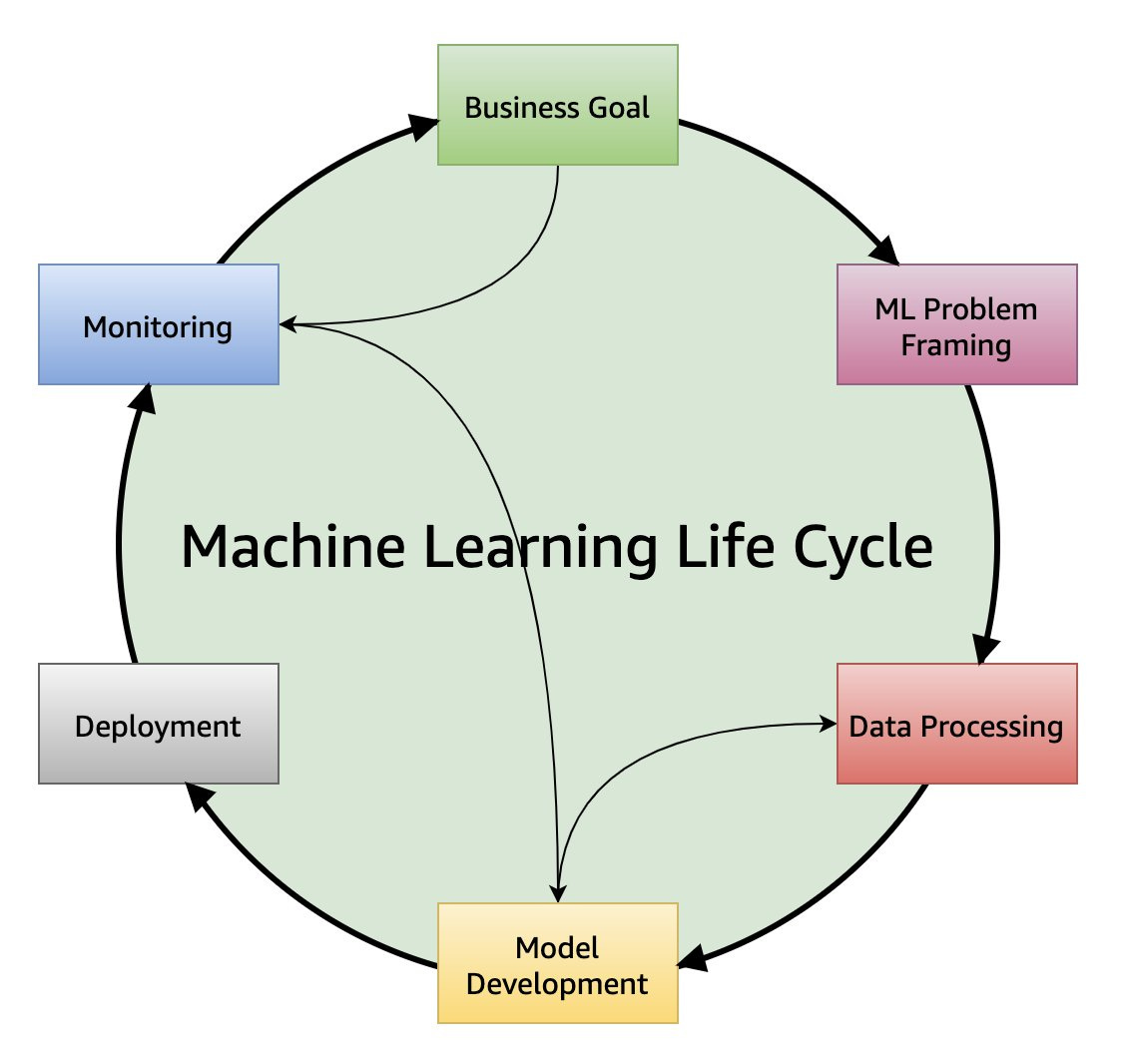
Before we get into the nitty gritty, let’s remember that the ML lifecycle is well defined: Starting with the business problem, you frame the ML problem, process the data, develop the model, deploy it, and finally monitor it. The scientists spend most of their time in the first half of the workflow, the engineers in the second half, and the unicorns running laps around everyone. As a scientist, I have a lot of tools at my disposal. I can use Pandas, Polars, NumPy, Spark, and the 43 other Pokemon-name-looking libraries I have on my resume for processing data. Then there’s modeling with the legendary Scikit-Learn, PyTorch, TensorFlow, CatBoost, LightGBM, and again the list goes on with new libraries and methods coming out all the time. Not to mention the business context and why ML is, or isn’t, the right tool for the problem, which I list last not because it’s the least important - quite the opposite - but because it’s easy to spend a couple days modeling before you think “huh, why not just use regex?”. That reasoning is lost somewhere in your notes, you move on, and hope you never have the thought again.
All of this to say that the workflow is well defined but hilariously fragmented. We spend so much time understanding syntax that we can’t spend enough time on how the problem should be solved. Or worse, we over-engineer the wrong path and run out of time for other promising avenues. As someone who has tried to create libraries to automate data ingestion, processing, modeling, and evaluation for narrow problem sets, software felt too rigid and would just become obsolete when a better library came along. This is the first time I’ve felt like it was possible to build something that would be flexible enough to withstand changing data and shifting libraries, while being stable enough to glue it all together and allow me to experiment at the speed of my ideas. I don’t need to question whether I have the time to test something anymore - the code is there if I can dream it up and golly am I dreaming.
What is Agentic-ML?
My workflow is agentic-ml: a collection of 5 commands that scaffold any machine learning project. Each one builds on the context from the last, so by the time you’re running experiments the agent remembers the problem, the data, and what success looks like. One idea runs through the whole thing: context is precious and code is disposable. Every experiment is independent and append-only - the agent writes fresh code for each experiment but never throws away what it learned. That’s backwards from how most of us were trained, but it works because reviewing a single experiment is infinitely easier than untangling a web of agentic code. Here’s what each command does.
Command 1: Frame the ML Problem
Assuming the business has a problem to solve and ML is a good fit for it, you start here. This command asks four questions:
What are you optimizing for? Obviously without this, you don’t have anything to solve.
Does a specific failure case matter more than the others? This will dictate what sorts of metrics you want to keep track of.
Do you have any constraints? This informs what types of solutions you should focus on.
Where is the data? I like to add a sentence or two about the data for extra context but the next step does a good job of figuring it out.
Designed to take under 5 minutes, the agent has some context that becomes foundational documentation for all downstream steps. This is probably the most important, but easily underrated, aspect of these sorts of workflows. Creating concise yet complete artifacts as context to leverage indefinitely during future experiments keeps the agent from going off the rails.
Command 2: Explore the Dataset
After we have a high level overview of the problem, but before we get into too much detail, we ask the agent to explore the dataset and produce a report for more documented context. The agent works through the following checklist:
Shape and schema
Target variable distribution
Missing values
Feature distributions
Feature leakage checks
Feature / target signal analysis
Various data quality issues and “anything weird”
While writing the first draft, I found myself doing something funny: I was googling around for different profiling tools like pandas-profiling (named ydata-profiling now), trying to figure out if there’s a Polars variant, and what the heck to do with reading in data that’s too large for Pandas, etc. I had already fallen back into the traditional questions of how to solve the problem instead of having the LLM figure it out while I led it to the outcome I wanted. I had to remember that code is now instantaneously created - I don’t need a profiling tool. I can just prompt “Think about the best tools to explore the dataset given the problem and dataset size. For example, Pandas is fine for moderately sized data but Polars is best for large datasets (millions of rows).” The agent can take a look at the first several rows, create a script, and output a reasonable analysis with a full report in no time. With the high level ML frame and knowledge of the data, we can move on to designing experiments.
Command 3: Design the Experiment Methodology
This is one of my favorite parts of the workflow because it starts becoming apparent that everything is working together. The agent helps us define:
What are the evaluation metrics? Which are primary or secondary? What’s fun about this step is that the agent can suggest specialized metrics that you can then learn more about if you probe deeper. Don’t forget to use the agent to learn as you go along!
What’s the validation strategy? I’ve had a lot of success benchmarking both zero shot and trained models at the same time, and having the agent switch between no test split and a proper cross validation scheme depending on the experiment. It makes iteration so quick!
What’s the baseline? The agent tends to do a really good job at giving fair choices - a naive or simple model can be hard to beat and it used to be time consuming setting them up.
What does success look like? The most important question of any ML problem! I like to set the bar high and have the agent try to reach it knowing the real bar is lower.
This ends the collection of framing and experiment design context. We’re ready to train some models.
Command 4: Run the Baseline
Now the fun really starts - time to get some results! The agent picks up the baseline model instructions from the experiment design, does additional research (this blew my mind and can give the workflow more grounding in parameter initialization and avoiding gotchas), creates a baseline folder in the project’s default structure, writes a design artifact, writes the modeling script, executes it in Docker, records the results, and finally gives you a summary of what happened. Specifically, the report outlines:
The modeling approach: Summarize the script in words so downstream consumers, human or LLM, can easily get up to speed.
Primary and secondary metric results: This keeps the agent grounded in what performance we need in order to accept more solution complexity.
Cross validation metrics, if applicable: This is a good first signal whether your cross validation split is wonky. It’s important to surface diagnostic metrics that help the agent see when something is wrong.
Feature importance: I added this after a synthetic experiment (before vs. after) showed the workflow failed to recognize features as levers in the modeling process. I’m torn since it’s biased toward tabular problems and a good operator could steer the agent down a feature engineering path, but it’s a work in progress.
Comparison to the success threshold from the Design step: Lastly, do we keep going or not? Sometimes a baseline is enough to solve a problem, and it reminds the agent that we have a project-level goal.
Now you have everything you need to start experimenting. Without this workflow, this might have taken a day or two on an easy problem but I often reach this point well within an hour. Not only that, if we want to tweak anything it’s as easy as asking the agent to update a markdown file and run everything again. That can be a nightmare with a manual experimentation loop.
Command 5: Run Experiments
We’ve finally reached the core loop. Until this point, the workflow has been generating context that it can use in service of getting us to our definition of success. Experiments work very similarly to the baseline but focus more on what might help it improve as opposed to solely on the current state. Specifically, it:
Reads all previous context if necessary. This is important so you can start new sessions and pick up exactly where you left off. Personally, I’ve been holding long sessions so I can color outside the lines a bit but I’ve found it works very well either way.
Proposes the next experiment and prompts the user for feedback. It prioritizes simplicity first and aims to balance data augmentation, model tuning, and model selection.
Researches the approved approach for extra guidance. It’s nice to be able to rely on wider literature in addition to what the agent is capable of internally.
Creates a new experiment folder for your context artifacts - the research, design, script, and results. As I referenced earlier, it keeps a full audit trail of what’s been done, even if they’re highly overlapping, by treating code as disposable. The anti-pattern of repeating code is a feature of the workflow that enables human comprehension and intervention when it’s necessary.
Implements and runs the experiment in Docker.
Records the results in the experiment folder. Those results specify: The approach, overall results, validation results, comparison to baseline and best previous experiment, comparison to the success threshold, feature importance information, and general observations. This is what allows experiments to build on one another.
Because the agent is directed to record and understand the shortcomings of prior attempts and your goals, has extensive ML knowledge, and can further this knowledge with research tools, it tends to make very good suggestions. That said, this is where your creativity shines through by directing the agent to bring your various ideas to life. You’ve automated all the context work so you can focus on how you want to solve the problem - you stay in control while you let the agent keep everything aligned. That’s the whole point!
How Have I Used It? Is It Worth It?
Apart from running several experiments on toy and synthetic datasets, I’ve used agentic-ml at work with great success. Recently, I was asked to create 3 similar but distinct models to match user queries to changing catalogs. I had rather small and noisy datasets for validation, but otherwise I had a nicely defined problem: Classify queries in such a way that the model could abstain from a classification and generalize to new labels while maintaining high precision with a low false positive rate. Over the next two weeks, while also working on other priorities, I ran over 50 variations of experiments. This simply wouldn’t have been possible without this workflow. Heck, even with just chatting in a session it would have taken forever to keep all the context aligned and describe the scaffolding we walked through above. There’s just no upside to solving a problem in any other way anymore. The result was three pipelines with pre-trained retrievers and Gemini Flash as the classifier, and a few-shot variation for one of the use cases that was struggling with subjective labels. I was able to try a handful of open and closed source retrievers and classifiers, pivot and re-run experiments, and incorporate feedback from colleagues with no switching cost at all. It was so easy.
If it’s so easy, then do I bring value anymore? This feels like a common question for anyone working with AI. My answer, after 50 experiments, is that we have a different sort of craft now, for better or for worse, but it’s not gone: We need to shift our time from code generation to problem understanding. We have to take the requirement to “build a model that does X” and ask the questions that surface what X really means. In the project above, that meant surfacing why a false positive costs more than a miss. It’s the questions like “what if the model selects a partially correct option?” that will differentiate us from here on out. From a code generation perspective, the agent can do it much faster than I can but it’s also easier to make small mistakes with big consequences. That’s exactly what happened even after instructing the agent to avoid false positives: On a winning variant, the agent decided that when the model both abstained and picked a valid option, it should take the option. Instead, I wanted it to drop the valid pick to keep the false positive rate down. This case never occurred in the dataset, so it didn’t affect any offline metrics, but this is the sort of thing that can surprise you in production.
Even if we do end up engineering around these shortcomings, stakeholders want a human accountable. I don’t see that part of psychology changing for quite some time, maybe even generationally. I don’t know about you, but hearing someone say “oh, I’m not sure, the LLM cooked it up” just doesn’t give me the fuzzy feeling that everything is going to be alright. That said, it’s also impractical to review code from 50 experiments. Instead of reviewing everything, I only take a look when a result is unexpected or I want to take a good result to production. A lot of the time I’ll pause to learn about a technique I’m not familiar with, which happens when you’re working with an agent that can scour the Internet in the blink of an eye. Instead of chasing raw output, I’ll take a 2-5x boost while learning a ton.
This is the craft now: Be able to state your opinions about how to solve problems clearly enough that an agent can run them in your place. It’s a lot harder than it sounds, and that’s exactly why it’s worth getting good at. So codify yours, too. Who knows - maybe this is how we differentiate ourselves going forward, by turning what we know into natural language code.
About the Author
David Albrecht is a data scientist with nearly a decade of experience building models across a wide variety of domains. He enjoys tinkering with data, models, and the tools that connect them.